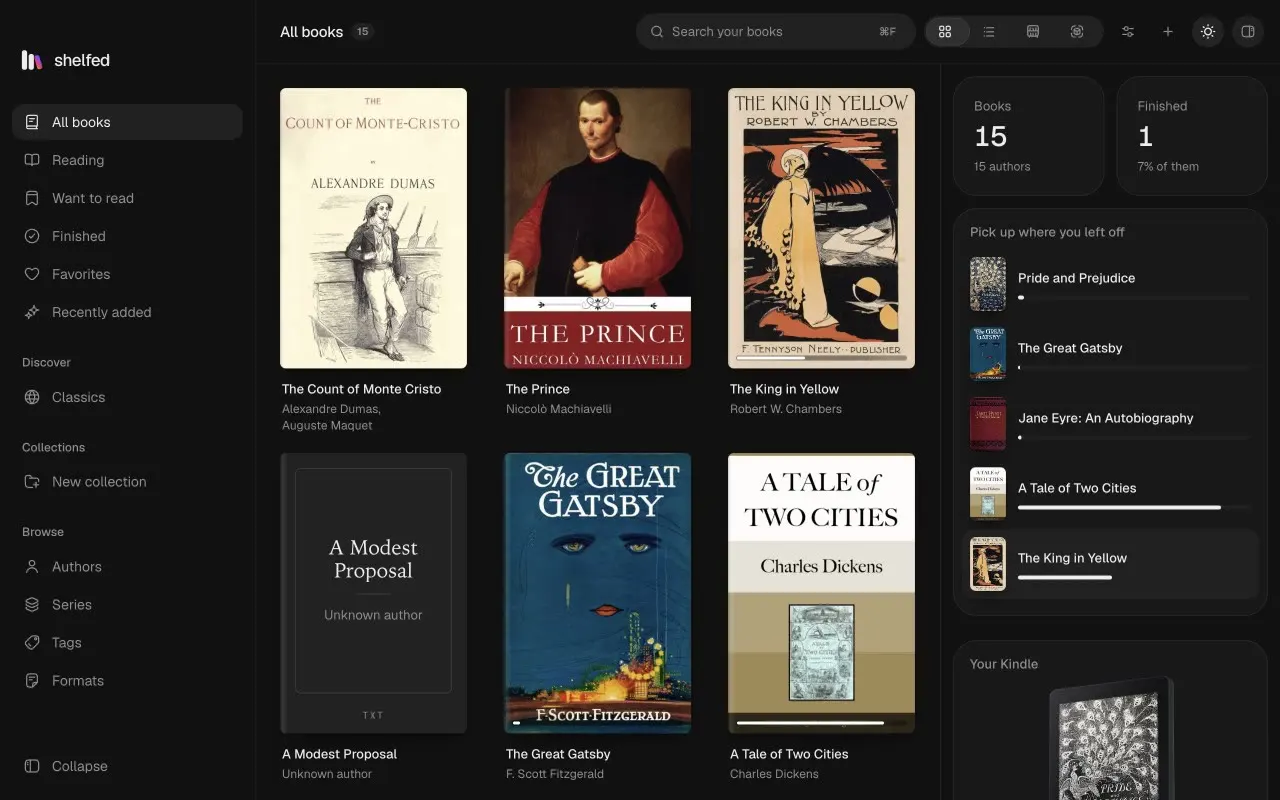
Every book where you can see it.
Covers, a list, shelves, or a bookcase in oak, walnut or slate.
- Plain files, a folder per author
- Details from Open Library
- Collections, ratings, search
Opens where you stopped.
One calm reader for every format, with highlights and notes.
- Light, sepia, dark or black
- Bookmarks and search
- PDFs and comics too
It knows your Kindle by name.
From a Kindle 2 to a Colorsoft, in 3D, in its own colour.
- Each model since the Kindle 2
- Read from its serial number
- Its highlights come back
Drop a book on it. It's there.
Copied by cable, or sent by email to any Kindle, anywhere.
- Kindle file made for you
- From your own mail account
- Gmail, Outlook and iCloud ready
And make it yours.
Light or dark, and eight app icons to choose from.
- A colour for every spine
- Ribbons in the books you're reading
- Paper, oak, walnut or slate
A quiet home for your books.
Download Shelfed
Version 0.2.0, for Mac and Windows. Other downloads
Why it's safe to try
Free and open source.
No account, no subscription, no paid version.
Your books stay yours.
Plain files on your computer. Nothing is tracked, and Shelfed only goes online when you ask.
Nothing else to install.
Reading, converting and sending to your Kindle are all built in.
Everything in it.
Your library
- Covers, a list, shelves or a 3D bookcase
- Plain files, one folder per author, movable anywhere
- Browse by author, series, tag or format
- Collections, favourites, ratings and reading status
- Box sets, a reading pile and rainbow order on the bookcase
- Covers, descriptions and publishers found online
- Removing a book can be undone
Reading
- Opens every book where you left it
- Highlights, notes and bookmarks, copied out as Markdown
- A commonplace book of every line you've marked
- Search inside the book
- Light, sepia, dark or black pages
- The book's own type, a serif or a sans, at any size
- Pages to turn, or one long scroll
Kindle
- Recognises every model from the Kindle 2 on
- Copies by cable, making the Kindle file it needs
- Sends by email from your own mail account
- Ready settings for Gmail, Outlook and iCloud
- Brings your Kindle highlights back from My Clippings
- PDFs laid out to fit a Kindle's screen
Converting
- EPUB, AZW3, PDF, Word, FB2, text or a web page
- From any format Shelfed can open
- PDFs into EPUBs with chapters, headings and pictures
- PDF pages in A4, A5, Letter or Kindle size
- All built in, with nothing else to install
- The new file sits beside the old one
Finding books
- Thousands of free classics from Standard Ebooks
- And from Project Gutenberg, a click each
- Suggestions from what you own, worked out on your computer
- Drop files or whole folders anywhere on the window
- Opens books straight from Finder or Explorer
Yours
- Light, dark, or following your system
- Eight app icons to choose from
- A spine colour and a ribbon for every book
- No account, no tracking, works offline
- Updates itself, if you let it
Opens
- EPUB
- MOBI
- AZW3
- AZW
- PRC
- FB2
- CBZ
- Word
- Markdown
- HTML
- Text
Makes
- EPUB
- AZW3
- Word
- FB2
- Text
- Web page
Bring your books home.
Open it, drop your books on the window, and they're in.
Download Shelfed
Version 0.2.0, for Mac and Windows. Other downloads
Good to know.
- Is it really free?
- Yes. Shelfed is open source under the MIT licence, with no paid version, no account and nothing to subscribe to.
- Which Kindles does it work with?
- Every Kindle, by email. By cable, the ones that show up as a drive when plugged in, which is most made before 2024. Newer ones, like the 2024 Paperwhite and the Colorsoft, connect the way phones do, so Shelfed sends to them by email for now.
- Can it open books I bought on Amazon?
- Not if they have DRM, as most do, and Shelfed doesn't remove it. Books without DRM, from anywhere, open fine.
- I use Calibre. Can I bring my library?
- Drop its library folder on Shelfed. Each book comes in once, with all its formats, its cover, and the title, authors, series, tags and rating you gave it in Calibre. Only Calibre's custom columns stay behind.
- Where are my books kept?
- In a Shelf Library folder in your Documents, a folder for each author, as ordinary files. Move it anywhere from Settings.
- What does it go online for?
- Only when you ask: book details from Open Library and Google Books, free classics, sending to your Kindle through your mail server, and checking GitHub for updates, which you can turn off.
- Why does my computer warn me the first time?
- Shelfed isn't signed with a paid certificate yet. On a Mac, open it once, then go to System Settings, Privacy & Security, and click Open Anyway; on macOS 14 or earlier, right-click it and choose Open instead. On Windows, choose More info, then Run anyway.
- What does it run on?
- macOS on Apple silicon or Intel, and Windows 10 or 11 on x64 or ARM. On Linux it runs built from the source.